Core Functionality

Rotor Control

The server manages serial communication with your rotor controllers and bridges them to N1MM Logger over UDP.

๐Ÿ”„

Up to 16 Rotors

Each rotor runs on its own USB serial port. All rotors operate independently with individual poll rates, offsets, and storm settings.

โšก

Adaptive Poll Rates

Idle rotors are polled at 1000 ms (configurable). When moving, the rate drops to 200 ms for smooth, responsive position tracking.

๐Ÿ”Œ

USB Auto-Reconnect

Detects serial port disconnection after 3 consecutive errors and retries every 5 seconds โ€” no manual intervention required.

๐Ÿ“

Heading Offset

Per-rotor offset from โˆ’180ยฐ to +180ยฐ compensates for mechanical misalignment. Applied transparently to all queries and broadcasts.

๐Ÿ›‘

Stall Detection

If a moving rotor fails to change heading by at least 5ยฐ within 5 seconds, the server automatically declares a stall and returns to idle polling.

๐ŸŽฎ

Simulate Mode

Each rotor can run in simulate mode โ€” no serial port needed. Movement is modelled with a trapezoidal velocity profile (1.5โ€“20ยฐ/s) for testing.

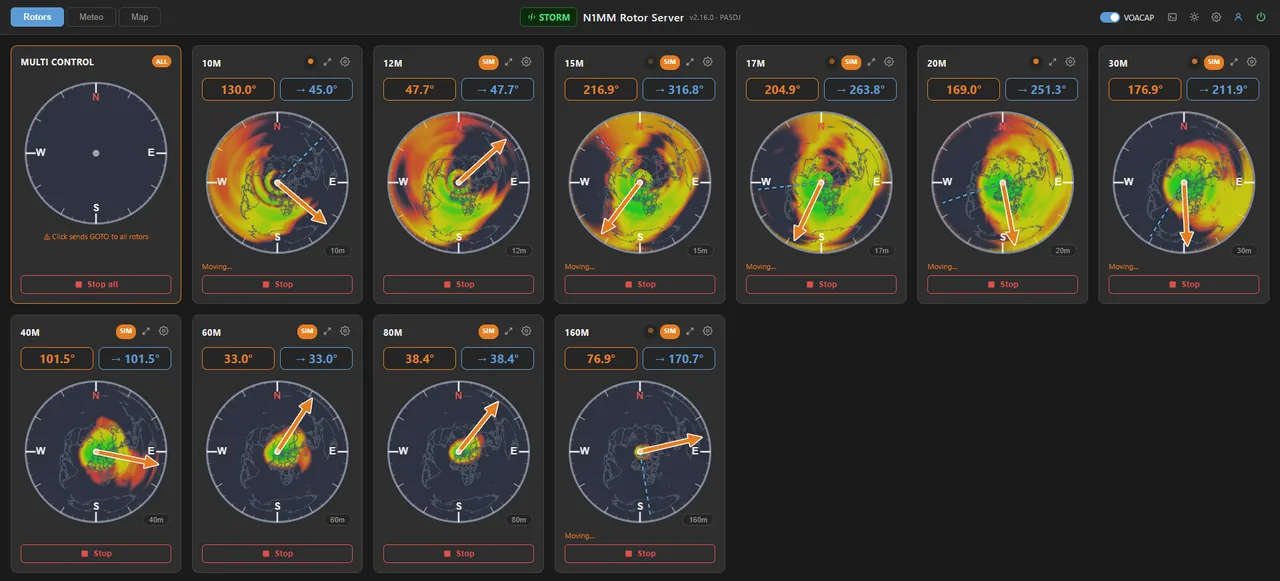
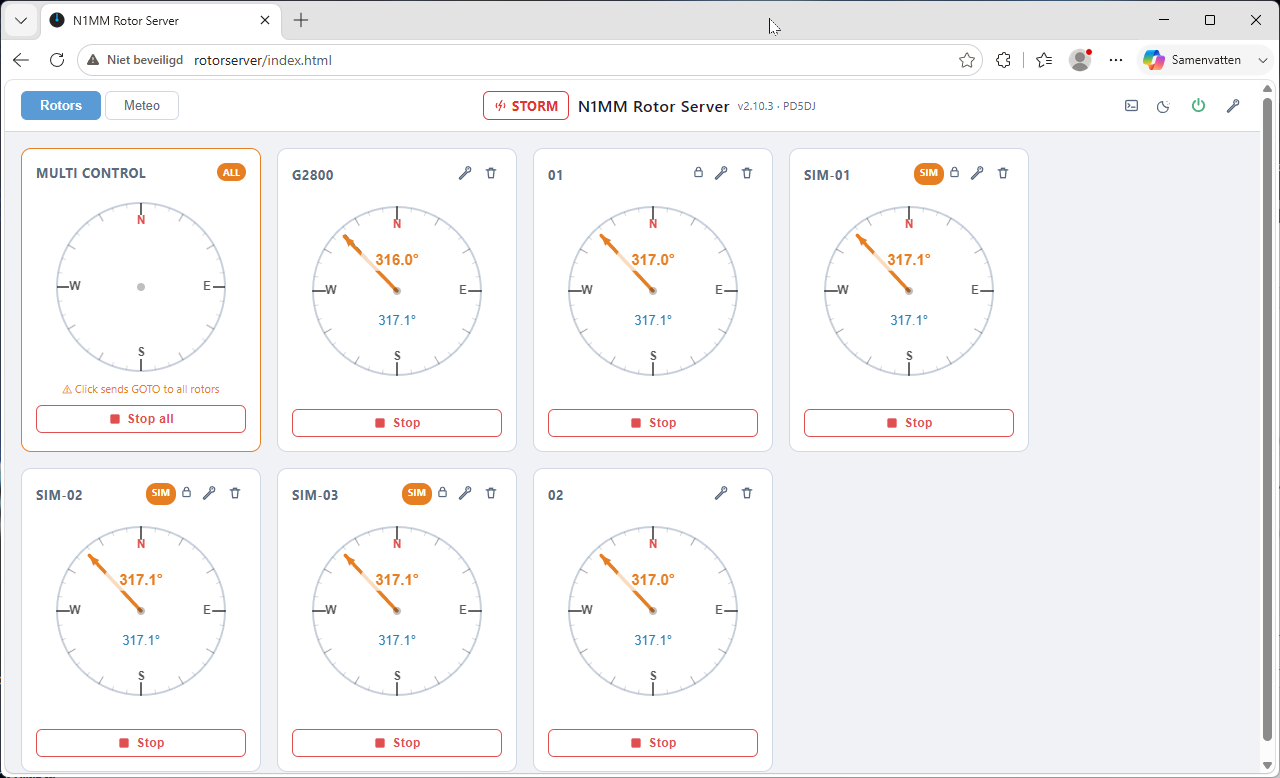
Rotor compass cards

Live Position Broadcasts

Position is broadcast via UDP to N1MM Logger in the standard format:

NAME @ CURRENT_AZ*10 / TARGET_AZ*10
2m yagi @ 1800 / 2250

Each rotor has its own broadcast timer. Two independent broadcast ports are supported for dual-client setups (N1MM Logger + N1MM Rotor Client).

  • Primary broadcast port: 13010
  • Secondary broadcast port: 13011โ€“13015 (optional)
  • Configurable broadcast address(es) โ€” multiple subnets supported

Hardware Compatibility

Works with your existing rotor controllers

N1MM Rotor Server connects to rotor controllers via USB serial. Currently two protocols are implemented.

Yaesu GS-232A / GS-232B โ€” supported by Yaesu G-series controllers (G-450, G-800, G-1000, G-2800) and many compatible third-party units. The exact variant is auto-detected.

Prosistel CBOX 2003 โ€” supported for Prosistel rotor controllers.

The protocol and baud rate are selected per rotor in the web interface settings.

Network Protocol

N1MM Logger UDP Integration

Drop-in replacement for the N1MM Rotor Client โ€” uses the same well-known XML-over-UDP protocol.

Incoming Commands (port 12040)

N1MM Logger sends XML packets to the server:

<N1MMRotor>
  <rotor>2m yagi</rotor>
  <goazi>180</goazi>
  <offset>0</offset>
</N1MMRotor>
<N1MMRotor>
  <rotor>2m yagi</rotor>
  <stop>1</stop>
</N1MMRotor>

Position Broadcast (port 13010)

The server broadcasts position to N1MM Logger:

2m yagi @ 1800 / 2250

Values are heading ร— 10 (tenths of degrees). The example above means current 180.0ยฐ / target 225.0ยฐ.

Dual broadcast: Set bcast_port2 to also broadcast on a second port (13011โ€“13015) for simultaneous N1MM Rotor Client compatibility.

UDP Control Commands

Send plain-text commands to the server's command port for remote storm control:

CommandEffect
STORM ONActivate storm protection (same as web UI toggle)
STORM OFFDeactivate storm protection, release all rotors
STORM FORCEImmediately apply storm correction, bypassing sustain timer
WIND?Request an immediate wind data broadcast

Safety

Automatic Storm Protection

When wind exceeds your set threshold, rotors are automatically parked to a safe position โ€” and held there until it calms down.

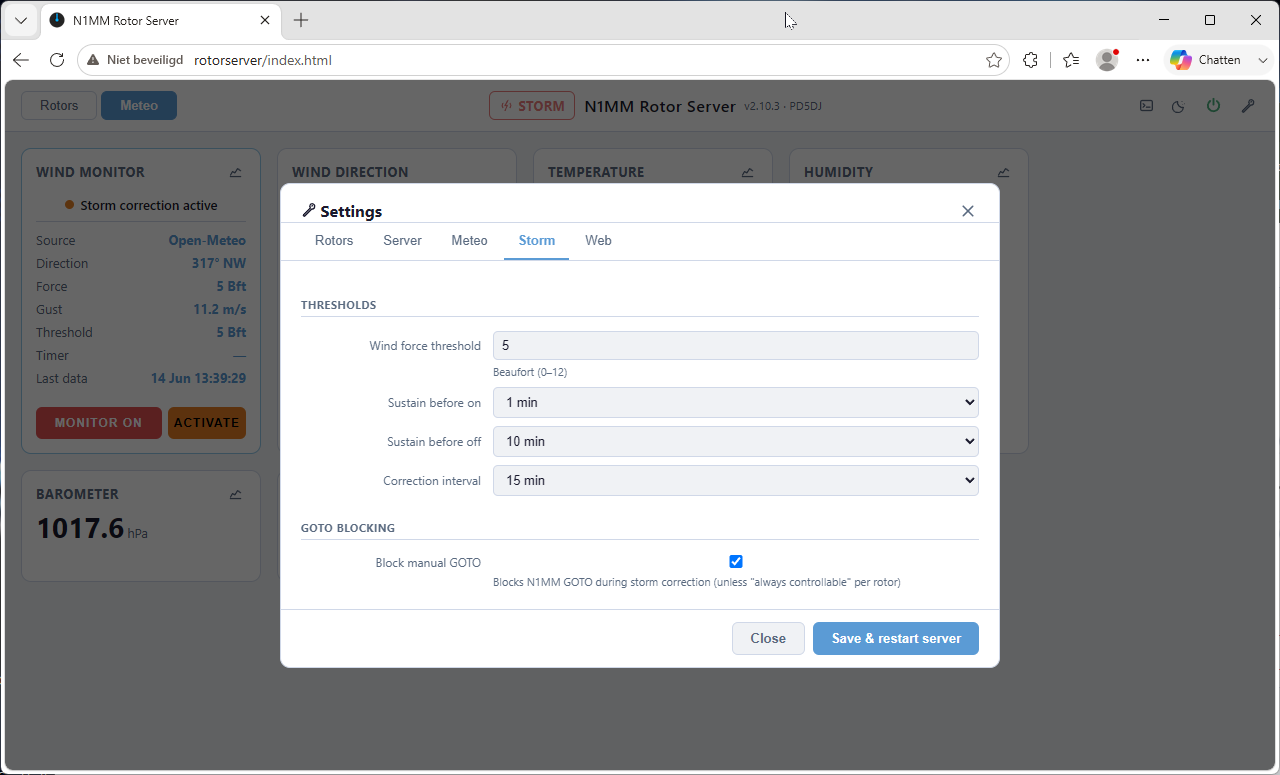
Storm settings panel

Beaufort-Based Threshold

Set your storm threshold from Beaufort 0 to 12. The server requires the threshold to be sustained for a configurable number of minutes before activating, preventing false triggers from wind gusts.

  • Threshold: Beaufort 0โ€“12
  • Sustain time before activation (minutes)
  • Release time before deactivation (minutes)
  • Re-send GOTO interval (5/10/15/30/60 min)
  • Option to block N1MM manual control during storm
๐Ÿงญ

Wind-Aware Parking

Rotors are parked relative to the wind direction, not a fixed angle. A per-rotor storm offset lets you aim into the wind, away from it, or any other bearing.

๐Ÿ“Š

Circular Direction Smoothing

Wind direction is smoothed using a circular mean of the last 10 readings, filtering out momentary spikes before applying storm correction.

โ†ฉ๏ธ

Auto Return Timer

When always_controllable is enabled, a per-rotor timer automatically returns the antenna to the storm-safe position after a manual GOTO.

Per-Rotor Storm Options

OptionDescription
storm_enabledInclude this rotor in storm correction
storm_offsetBearing relative to wind direction (โˆ’180 to +180ยฐ) to park the rotor
always_controllableAllow N1MM GOTO commands even during active storm correction
return_timeout_minMinutes after a manual GOTO before auto-returning to storm position (0=off)

Weather Integration

Wind & Meteo Sources

Six different data sources โ€” pick the one that suits your setup. Switch at any time from the web UI.

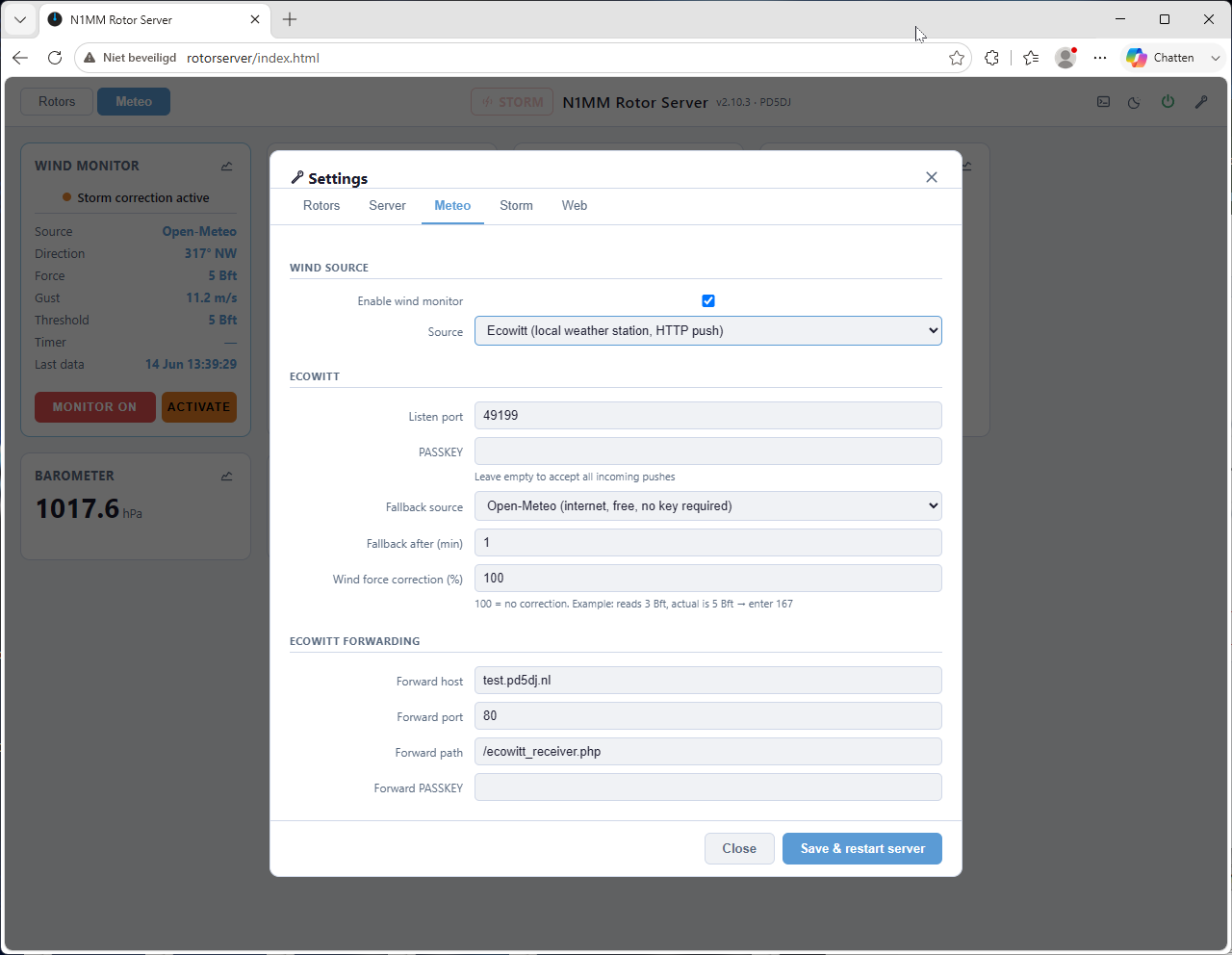
Meteo settings

Internet Weather APIs

Four online providers, selectable from a dropdown. Enter your latitude/longitude and optionally an API key.

  • Open-Meteo โ€” Free, no API key required (default)
  • yr.no โ€” Norwegian Meteorological Institute, free
  • OpenWeatherMap โ€” Requires free API key
  • WeatherAPI โ€” Requires free API key

Fetch interval: 5, 10, 15, 30, or 60 minutes.

๐ŸŒฆ๏ธ

Ecowitt Weather Station

Receives live HTTP POST data from Ecowitt-compatible stations. Optional PASSKEY validation. Configurable fallback to an internet source when no push is received for N minutes. Data can also be forwarded to a second server.

Local stationReal-timeForwarding
๐Ÿ”Œ

Serial Wind Sensor

Connects to a serial wind anemometer on any configurable /dev/serial/by-path/ port at a configurable baud rate. Full extended meteo data when available from the sensor.

Local sensorReal-time
๐Ÿ“ถ

UDP Wind Data

Listens on a configurable UDP port for raw wind data packets. Useful when another system on the network is already receiving or computing wind information.

NetworkReal-time

Available Meteo Data Fields

FieldUnitSource
Wind directiondegrees (0โ€“360)All sources
Wind forceBeaufort (0โ€“12)All sources
Wind gustm/sAll sources
TemperatureยฐCAll except basic UDP
Feels-like temperatureยฐCInternet APIs, Ecowitt
Humidity%Internet APIs, Ecowitt
Barometric pressurehPaInternet APIs, Ecowitt
Precipitation / rain ratemm/hInternet APIs, Ecowitt
UV indexโ€“Internet APIs, Ecowitt
Solar radiationW/mยฒEcowitt, serial

Propagation

Live VOACAP Propagation Overlays

See where each band is open right now โ€” directly under the compass needle of every rotor.

Rotor compass cards with VOACAP propagation overlays per band

Coverage Map per Antenna

The VOACAP area-coverage prediction for the antenna's band is re-projected to an azimuthal-equidistant disc centred on your station (the rim is the antipode) and drawn under the compass rose. The orange needle points straight into the propagation picture โ€” one glance tells you which directions work.

  • Per-rotor band selection โ€” a CSV of bands for multi-band antennas
  • Band chip on the compass cycles through the bands with a click
  • Power (watts) and mode (CW / SSB / FT8 / FT4 / WSPR) configurable
  • Refreshed every hour in the background, served instantly from the server's buffer
  • Maps survive restarts โ€” cached on disk, never re-fetched unnecessarily
  • Header switch turns the overlay on/off per viewer
โ˜๏ธ

Public Backend (default)

Out of the box the maps come from the free, donation-run Open HamClock Backend (ohb.hamclock.app). The server prefetches politely in the background โ€” one map per band per hour โ€” so page loads never hit the backend.

๐Ÿ 

Fully Self-Hosted (optional)

Want to be independent of any external service? setup_prop.sh builds a complete local VOACAP server (voacapl + voacap-service) on the same machine โ€” free and open source, no subscriptions, no internet needed after setup. The installer offers it as an optional extra.

Web Interface

Built-in Web Server

A separate lightweight HTTP server (runs on port 80) delivers the single-page app and exposes a REST + SSE API.

๐Ÿ“ก

Server-Sent Events (SSE)

All live data (rotor positions, wind, log lines) is pushed to the browser via SSE โ€” no polling, no WebSockets. Each client gets its own stream on /api/events.

๐Ÿ”

User Accounts & Roles

Up to 8 accounts with three roles โ€” User (rotor control), Manager (storm & day-to-day settings), Admin (everything) โ€” with per-role permission checkboxes. New accounts get a temporary password by e-mail; "Remember me" keeps a login valid for 30 days. No accounts configured = open access with a first-run setup wizard.

๐ŸŒ™

Dark / Light Theme

Toggle between dark and light mode with the sun/moon icon in the menu bar. Theme is persisted in the browser.

๐Ÿ“ฑ

Responsive Layout + PWA

Works on desktop, tablet, and mobile. Compass cards resize to fit the viewport, every rotor has a fullscreen view, and the dashboard installs as an app (PWA) on your phone's home screen.

๐Ÿ”’

Optional HTTPS

One script (setup_ssl.sh) puts nginx in front with a free Let's Encrypt certificate and automatic renewal โ€” for secure access from outside your LAN.

โ†•๏ธ

Your Card Order

Arrange the rotor cards in any order with up/down arrows in Settings โ†’ Rotors. Open dashboards re-order live โ€” no reload needed.

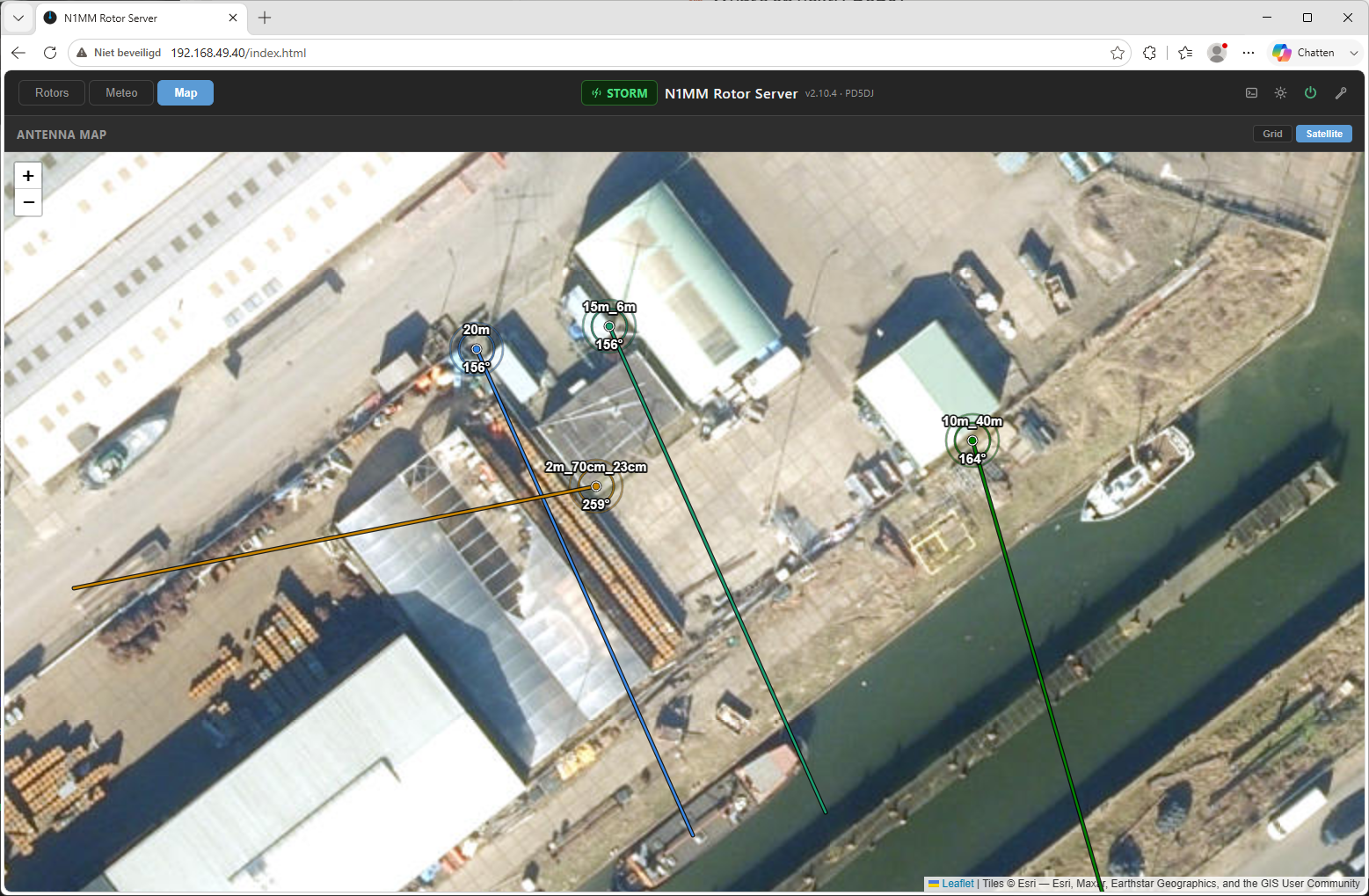
Antenna map โ€” satellite view

Antenna Map โ€” Satellite View

The Map tab plots every rotor at its real GPS position on Esri World Imagery satellite tiles โ€” your actual QTH from above. Each antenna gets a colored direction line that follows the rotor live, with the current heading shown next to the name.

  • Per-rotor latitude/longitude, set in the rotor settings
  • Direction line length configurable per rotor (in km)
  • Lines keep their real-world length at every zoom level
  • Fixed color per rotor for easy identification
  • Zoom and pan freely โ€” up to building level
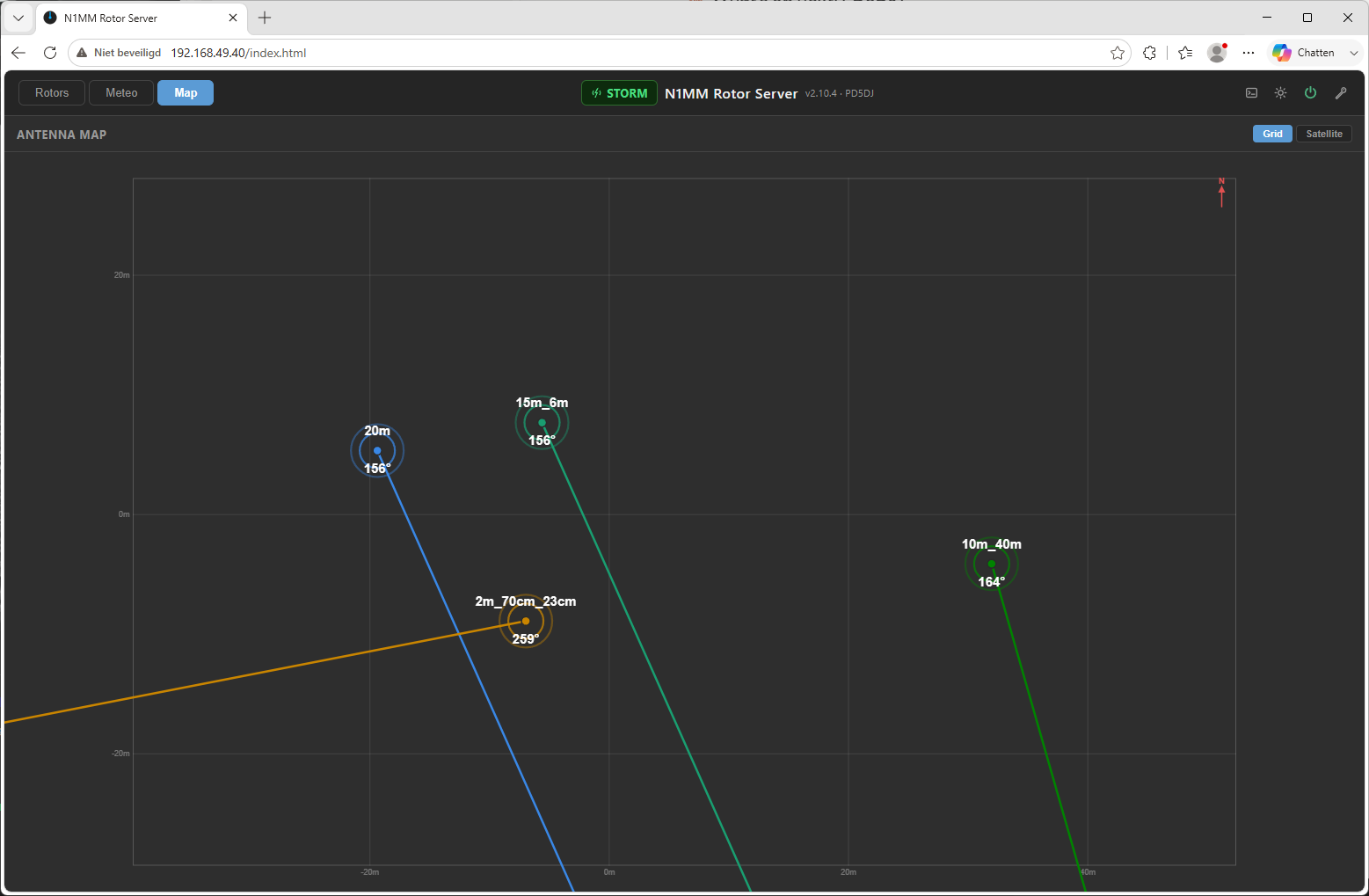
Antenna map โ€” grid view

Antenna Map โ€” Grid View

Prefer a clean site plan, or no internet in the shack? The grid view draws the same antennas and live direction lines on a schematic meter grid with a north arrow โ€” fully offline, no map tiles needed.

  • Meter grid with scale labels
  • North arrow for orientation
  • Works without an internet connection
  • View choice (Grid / Satellite) remembered by the browser
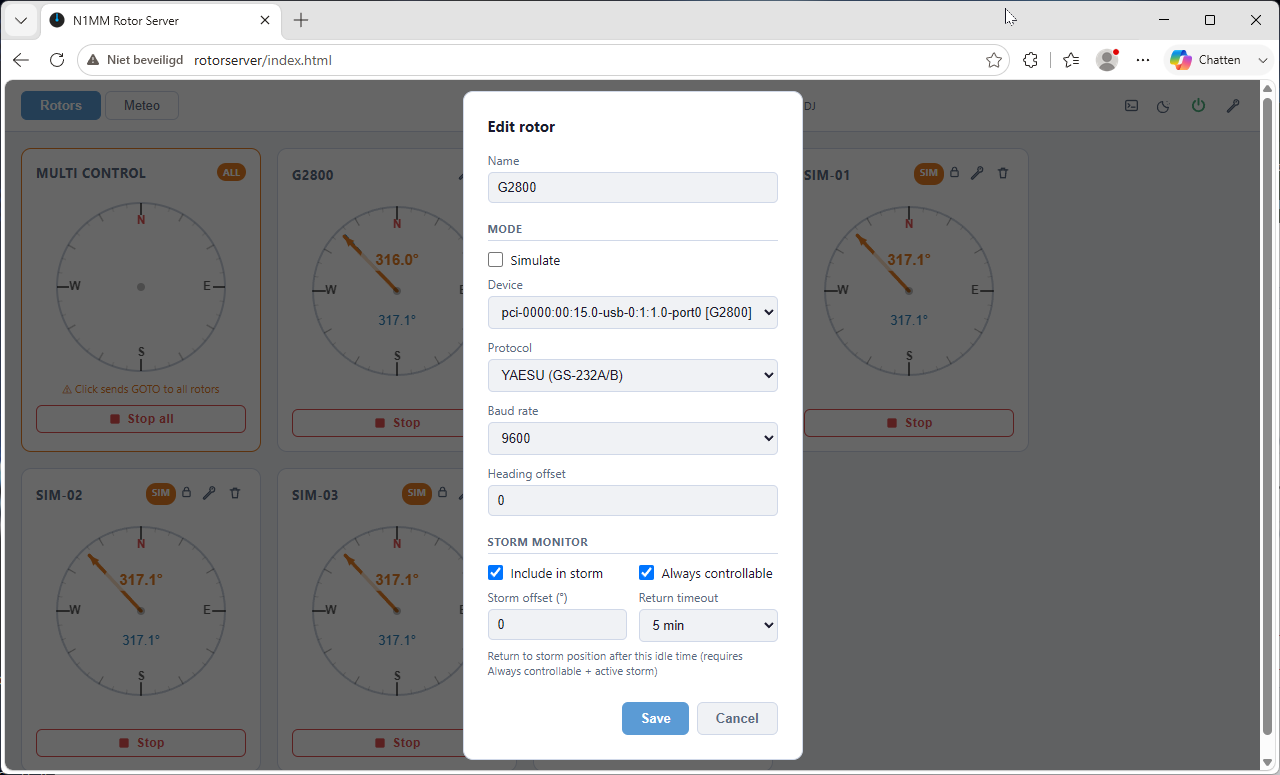
Add rotor settings

In-Browser Configuration

Add, edit, or remove rotors without touching the config file. The USB device spinner shows available serial ports and flags already-registered ones.

  • Add / edit / remove rotors
  • USB device auto-discovery
  • Simulate mode hides serial fields
  • Per-rotor antenna bands & VOACAP overlay bands
  • Card order with up/down arrows
  • Save & Restart with one click

REST API Endpoints

MethodPathAuthDescription
GET/api/statusPublicVersion, auth flags, live rotor & wind status
GET/api/configPublicFull configuration as JSON (secrets excluded)
POST/api/configManager+Save configuration, optionally restart server (managers save only their permitted sections)
GET/api/eventsPublicSSE stream: rotors, wind, history (log lines only for logged-in clients)
GET/api/devicesPublicList available USB serial devices
GET/api/rotorsPublicRotor names + bands (used by the Windows client to follow N1MM's band)
GET/api/propPublicCached VOACAP area map for a band (?mhz=14.1), served from the prefetch buffer
GET/api/prop/discPublicReady-made propagation disc for a rotor (?rotor=โ€ฆ&band=โ€ฆ&size=โ€ฆ) โ€” used by the desktop/Android clients
GET/api/histPublicLast ~6 hours wind history (in-memory)
GET/api/hist-meteoPublicLast 48 hours meteo + wind (persistent)
GET/api/logLoginServer log tail โ€” ?since=unix or ?lines=N
POST/api/log/clearAdminTruncate log file
POST/api/loginโ€”Authenticate, returns bearer token + role ("Remember me" = 30-day token)
POST/api/gotoControlSend GOTO command (rotor name + azimuth)
POST/api/stopControlSend STOP command
POST/api/stormManager+Storm control: {"on":1} / {"force":1}
GET/POST/api/usersAdminAccount management โ€” add / reset / update / delete (temporary passwords are mailed)
POST/api/change-passwordLoginChange your own account password
POST/api/forgot-passwordโ€”Mail a new temporary password to the account's e-mail
POST/api/smtp-testAdminSend a test mail with the posted SMTP settings
POST/api/restartAdmin*Restart n1mm_rotor_server service
POST/api/rebootAdmin*Reboot the system
POST/api/shutdownAdmin*Shut down the system
Authentication: Pass the token as Authorization: Bearer <token> header or ?token=<token> query parameter. Tokens expire after a configurable idle timeout โ€” or after 30 days with "Remember me", surviving web-service restarts. Admin* = admin, or a manager when the power permission is granted.

Data Retention

History & Logging

๐Ÿ“ˆ

48-Hour Meteo History

Wind and meteo data is stored in a persistent CSV file (/etc/n1mm_rotor_server/wind_hist.dat) with automatic compaction every hour. Served as JSON via /api/hist-meteo. The web UI renders it as interactive graphs with 7 zoom levels.

๐Ÿ“‹

24-Hour Rolling Log

The server log (/var/log/n1mm_rotor_server.log) keeps 24 hours of entries with automatic rotation. High-frequency broadcast lines are excluded to avoid noise. Access via web UI or /api/log.

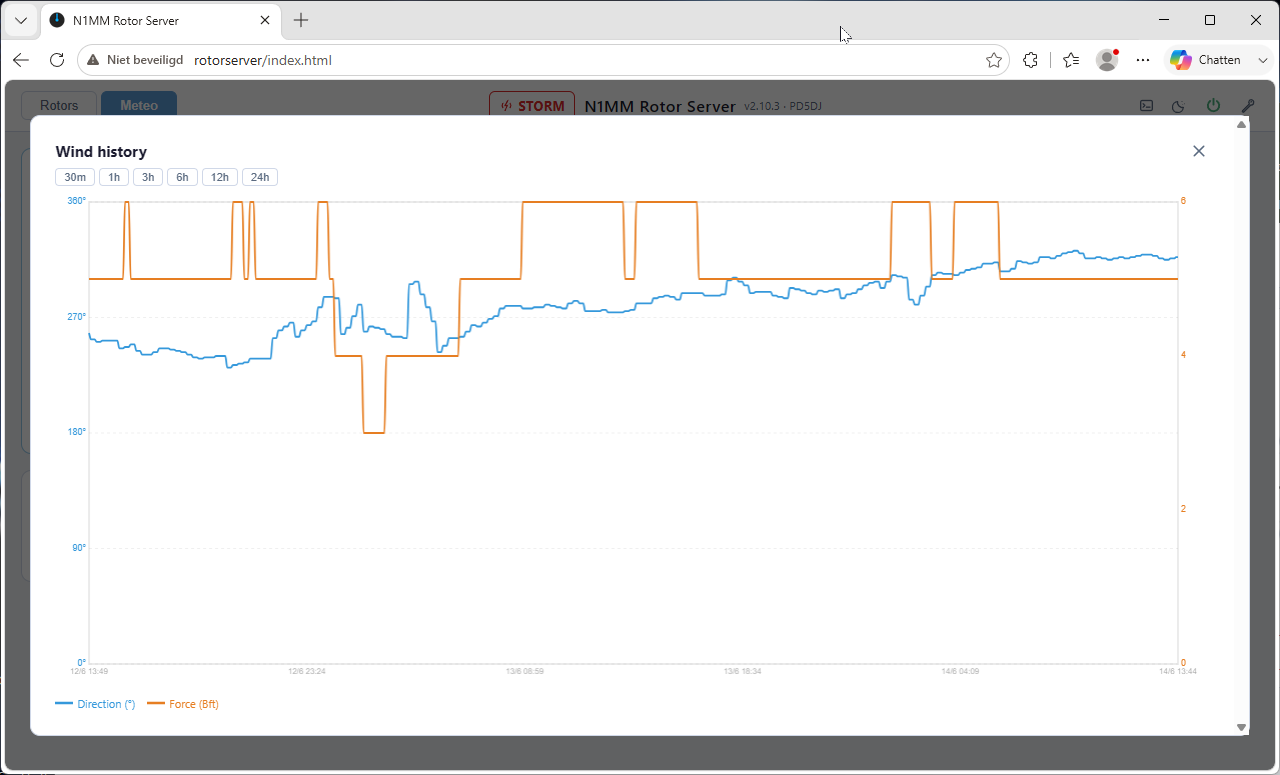
Wind history graph

Interactive History Charts

Click any meteo card to open a history popup. Pan and zoom across up to 48 hours of data.

  • Zoom levels: 30m ยท 1h ยท 3h ยท 6h ยท 12h ยท 24h ยท 48h
  • Horizontal scrollbar when zoomed in
  • Canvas-based โ€” fast even with thousands of points
  • Separate chart per data type

Advanced

Ecowitt Weather Station Integration

Receive live pushes from any Ecowitt-compatible weather station and optionally forward the data to a second destination.

๐Ÿ“ฅ

HTTP Push Receiver

Listens on a configurable TCP port (default 49199) for HTTP POST pushes from the station. Validates optional PASSKEY. Applies a configurable wind speed correction factor.

๐Ÿ”„

Automatic Fallback

If no push is received for N minutes (configurable), the server automatically falls back to an internet weather source. Resumes local station data when pushes resume.

โžก๏ธ

Data Forwarding

Optionally forward every received Ecowitt POST to a second host/port/path. Useful for redundancy or sharing data with other software. PASSKEY can be overridden in the forwarded body.

Access & Notifications

Accounts, Roles & E-mail

Give every operator their own login โ€” and let the server mail you when something happens.

๐Ÿ‘ฅ

Three Roles

User โ€” rotor control while no storm correction is active. Manager โ€” storm control and day-to-day settings. Admin โ€” everything, including accounts, server settings and power control. Per-role permission checkboxes fine-tune what each role may do.

โœ‰๏ธ

Mailed Temporary Passwords

Creating or resetting an account mails a temporary password automatically; the user must change it at first login. A public "Forgot password" flow mails a new one โ€” no SSH needed to recover an account.

๐Ÿ””

Event Notifications

Branded HTML mails (with a one-click dashboard link) on storm-correction start/stop, wind-source failover, rotor connection lost/restored, and server start. Any SMTP provider โ€” SSL, STARTTLS or plain โ€” with a built-in test button.

Deployment

Lightweight & Self-Contained

Two small C binaries. Runs on any Debian-based Linux system with minimal resources โ€” a Raspberry Pi is a perfect fit. Managed by systemd.

๐Ÿง

Lightweight & Efficient

Written in C99 with POSIX threads. Minimal memory footprint โ€” runs comfortably on a Raspberry Pi or any other Debian-based Linux system. Compiled with -O2. Two binaries: n1mm_rotor_server (rotor control) and n1mm_rotor_web (HTTP API).

โš™๏ธ

Systemd Services

Both binaries run as systemd services with automatic restart. The web UI can trigger restarts, reboots, and shutdowns without root privileges via sudoers rules.

๐Ÿง™

Interactive Setup Wizard

First-time setup via --setup wizard. Add rotors with --add, edit with --change, list with --list, delete with --delete โ€” all from the command line.

๐Ÿ“ฆ

Easy Updates

Included update.sh rebuilds and reinstalls binaries and web files, then restarts both services. A separate webupdate.sh updates only the web UI without recompiling.

โž•

Optional Extras

Two one-shot scripts extend the install when you want them: setup_prop.sh builds a fully local VOACAP propagation server, and setup_ssl.sh adds HTTPS with a free Let's Encrypt certificate (nginx reverse proxy, auto-renewal).

Want to set it up?

The documentation walks you through installation, configuration, and first use.

Read the Docs Download